For schools

The whole school week, on one page.

StudyBot reads the systems your school already runs, answers families from your own published pages, and flags what needs attention before anyone thinks to look.

Nothing leaves your school without a staff member approving it. EU data, GDPR-first, built for minors.

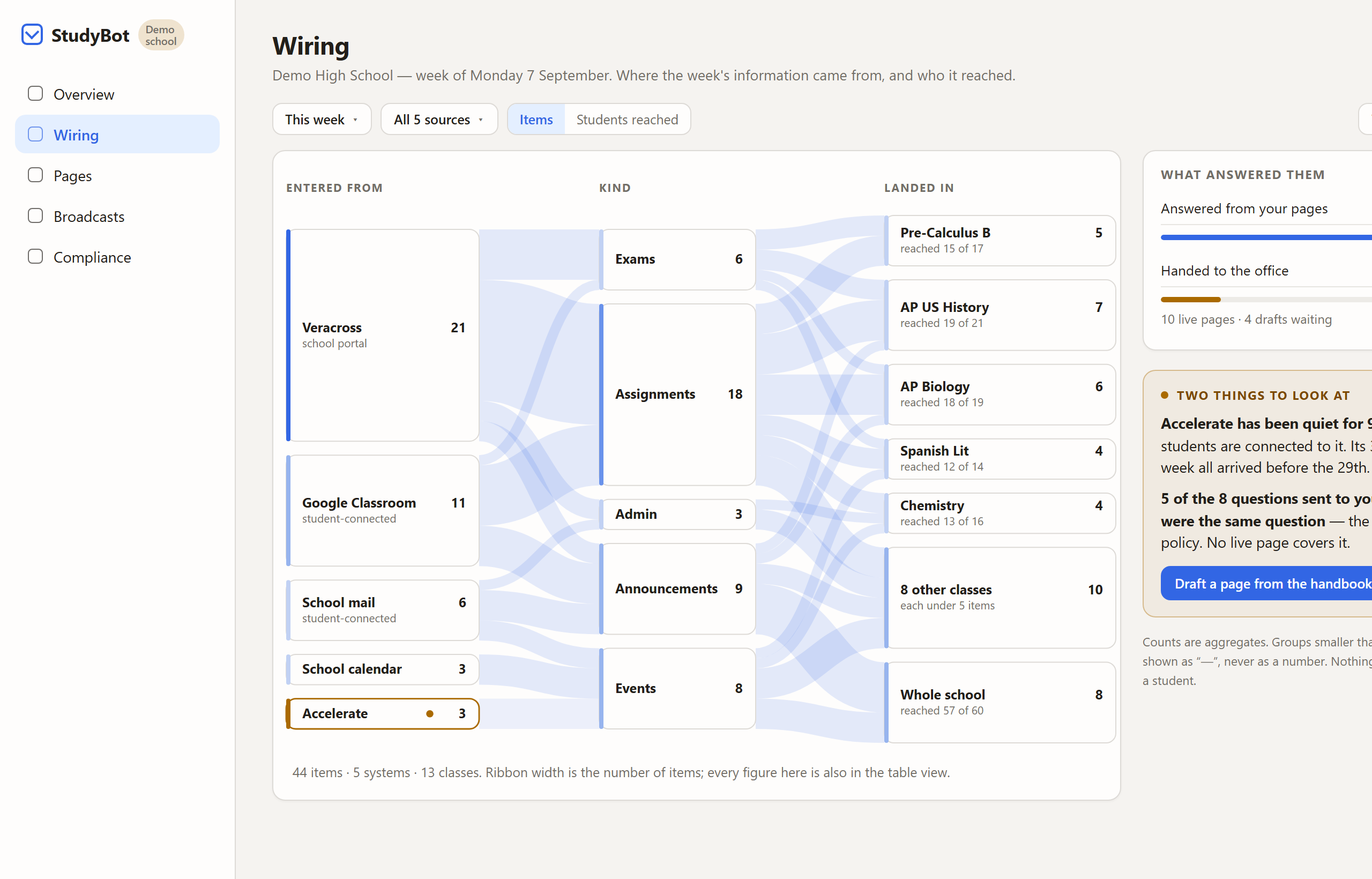
The Wiring view: a flow from school sources through kinds of update into the classes they reached, with quiet sources and unanswered questions flagged on the side

Where the week came from — and who it reached.

Why this holds up

Find, explain, flag. Not act.

Your school, this week

Find

"What time does school end on Fridays?"Answered from Dismissal & Pickup Times

Explain

Two of next week's deadlines land on the same afternoon as the senior recital.

Flag

Eleven families asked about uniform this week and your handbook does not cover PE kit.Handed to the office, not guessed at

The hidden workload

Your office is the integration layer.

Every system your school added solved a real problem, and none of them talk to each other. So the work of joining them up landed on the people at the front desk: the same question answered three times, the schedule that does not match what was published, the parent who cannot find the thing that was definitely emailed.

89%

of school email is not actionable

Measured in real connected student accounts at our partner school, comparing how often an item arriving by school email needed action against one arriving from the student information system.

5

separate sources behind one week

The configured source list at our partner school, before school email and the course platform were added.

0

systems you have to replace

StudyBot reads what you already run. There is no migration, and nothing for teachers or families to relearn.

A plain Tuesday

One ordinary day, four people, one page.

Nothing dramatic happens. That is the point: your school's own timetable, a room change, a question the handbook nearly answers.

07:10

StudentOpens one page and sees today's actual periods, the two things due, and the room that moved. However your week is set up — the same five days, alternating days, or a longer cycle that skips holidays — the day is already worked out, so nobody has to count it on their fingers.

08:40

TeacherPublishes a deadline and is told, before saving, that two other classes already have work due that afternoon. She moves it a day.

11:25

ParentAsks what time Friday dismissal is and gets the answer quoted from the school's own Dismissal & Pickup page, with the page named. No phone call, no reply-all.

14:00

OfficeSees that eleven families asked about PE kit this week and the handbook has no page for it. The gap is the alert, and one staff member writes the page once.

16:30

Head of schoolReads next week in one view: what is published, what collides, and what families keep asking that nobody has answered yet.

Why this holds up

Five things a head of school should press on.

One page for a stack that keeps changing

The mix of systems behind your school will not be the same in three years. New sources are added through settings, not procurement, and an integration built because one school asked for it ships to every school. You are not buying this year's configuration.

See the week as a picture, not a pile of logs

Wiring shows where each item entered, what kind of update it was, and which classes it reached — ribbon width is the count. Quiet sources and unanswered questions sit beside the figure, so a head can act without opening seven tabs. The same numbers are also a table: the diagram is an enhancement, never a trap.

Find, explain, flag. Not act

StudyBot is a command centre, not an agent loose in your school. It answers questions over your own data, makes the numbers readable, and raises what deserves attention. It does not take action on your behalf. No head of school wants software mailing six hundred families unsupervised.

Answers cite your pages, or refuse to guess

Every answer comes from your school's own published content and names the page it came from. When your pages do not cover the question, it is handed to the office rather than improvised. The questions nobody could answer become a list of pages worth writing.

Nothing leaves without a person signing it

Anything going out to families waits for a staff member to approve it. Each category of sharing is configurable and there is no route that bypasses human review. This is the part that lets a safeguarding lead put their name to the decision.
Your settings, not ours

The school decides what comes in and what goes out.

None of this is a support request. Each of these is a setting your office owns, in your school's own words.

  • Which sources StudyBot may read, and which it may not
  • Year groups named the way your school names them
  • Which calendar wins when two sources disagree
  • Your own pages, as the source answers are drawn from
  • Who receives which report, and how often
  • A review desk, so staff approve new answers before families see them
What it reads

The systems you already run.

Read from their own source, unchanged, with nothing for your students or staff to do differently.

School portals & information systemsAssignments and calendar events, from the system your school already runs

Live

For example, Veracross

Self-paced course platformsAssignments from online and self-paced courses

Live, about a week ahead

For example, Accelerate and Agilix Buzz

Classroom & assignment toolsAssignments and announcements, through your school's existing accounts

Live

For example, Google Classroom, via Google Workspace

School emailThe updates that only ever arrived by inbox

Live

Calendars & schedule pagesPublished calendars and schedule pages, including a student-built one

Live

These are the kinds of systems StudyBot reads, and we add new integrations as new schools bring them. Your school picks which are switched on, and a source you do not connect is a source StudyBot never reads.

Next step

Book a walkthrough on your own school week.

We build it around your school's actual timetable and calendar, so the first thing you see is your own Tuesday rather than a generic example. Email us and tell us your school; we will come back with the timetable questions we need and a time.

This week

A 30-minute walkthrough on your own timetable, with whoever you want in the room.

Same day

The written packet for your data protection officer and IT lead, so diligence starts immediately.

One term

Start with one year group if you would rather. Coverage is a decision you make, and can change.

No commitment in the first conversation, and coverage can start with a single year group. If it is not right for your school, we will say so rather than sell you a pilot.